So since playing with Flickr and working on a little fun project at work on (cough) folksonomies with Mr Webb, I’ve become obsessed with tags and the ways in which they can be used to build better navigational interfaces. Currently I’m interested in how we might use tags for better folder-less bookmark management in web browsers.
The way I see it, most people find the style of bookmark management commonly used in web browsers pretty much totally useless. Once you’ve added the two or three sets of bookmarks that you might use every day the bookmarks section of the web browser swiftly becomes very quickly a wasteland to which links may be consigned and never looked at again. After a while even the simple job of finding a URL that you previously bookmarked becomes so difficult that it is often easier to instead use Google to find the page afresh. Clearly there is something wrong here.
The most obvious thing that is wrong with bookmarks (other than that not enough browsers make them easily searchable) is that keeping them organised is an intensely complicated job. If you bookmark things regularly, it takes almost no time for your lists to grow to be hopelessly out of control. And then we’re expected to organise them into folders. But URLs and links can talk about any subject and can be categorised along enormous ranges of axes – they are much more suited towards databased organisation than they are the simple heirarchies that folders can afford. One URL will seem to fit into your ‘social software’ bin – but also would fit equally wellin your ‘do something about this URL’ bin, and perhaps should also be in your ‘relevant for latest project’ bin. Currently the only solution is to put the same thing in three separate folders – creating three bookmarks and no sense of how they relate to each other semantically. And putting things into multuple folders can be a slow and flow-disrupting process.
To summarise the problems with current bookmarking systems then, we could say that (1) the process is slow and annoying (2) that it requires us to continually refine and redevelop our taxonomies if we’re going to keep track of everything, (3) that URLs can belong in a number of bins and that (4) we can be left with unmanageably large lists. An ideal system would therefore speed the process up of both bookmarking a site and retrieving it later. An ideal system would try to alleviate the problems of categorisation and would work as an a priori assumption that a URL might wish to be stored in multiple bins. An ideal system would not display all the links by default. An ideal system would, in fact, use tags…
Now I’ve not worked through this completely yet, and I know there are some systems that allow the use of keyword addition and searching to a URI (I think it’s either in Firefox or is a simple plugin to it), but I don’t think they’re quite there yet. So let me walk you through where my thinking is at the moment and hopefully some of you guys can take it further or develop it in an interesting way.
So first things first, the process of adding a bookmark. On a mac you can either use a keyboard shortcut to trigger this or you can go to “Add Bookmark” in the main menu. Here’s one suggestion about what you might get when tried to bookmark a site:

Basically it’s all pretty similar to normal really except that you’re immediately given the option to type in keywords/tags that help describe the bookmark you’re trying to make. Now in this diagram I’ve kept in the option to edit the name of the bookmark itself, but I actually think this is a mistake. In the next picture (a mock-up of the preferences screen) you’ve seen that I’ve put in an option to make that name editable or uneditable. I’m thinking of the minimum practical keystrokes and suggesting that a user needs to be able to click on Apple-D and then immediately start typing keywords before pressing return to save the whole thing. Editing the name would seem on the whole to be a waste of time and user effort.

Now by removing the need to edit the name we’ve saved a little time (if we can get away with it, which is at best debatable), but surely adding the tags in by hand must take longer? Well the other thing you could add to the preferences would be the option to pull out the page’s meta keywords description and use them by default as tags (restricting it to the first ten or so, obviously) to create a basic set of tags to work with. Fast typists could turn this option off. If you wanted to really explore extreme possibilities then I’m sure it would be possible for a Google-created browser (for example) to pull useful keywords out of dmoz.
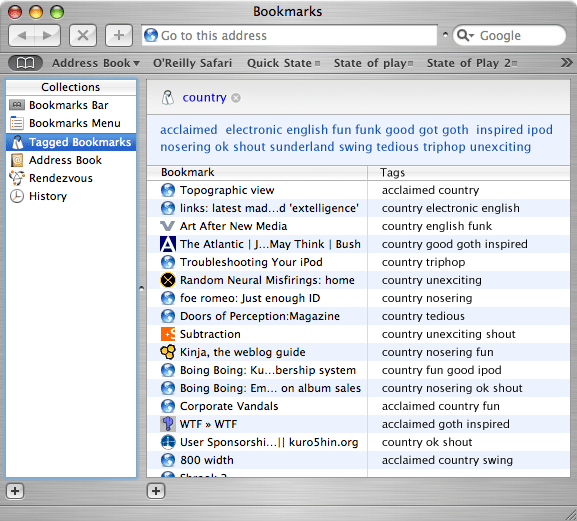
The next problem would be how to present this stuff to the user. Safari by default has a number of views of bookmarks. There’s no need to get rid of any of these – each should be simply a different way of allowing the user to browse through the stored addresses. I would be proposing adding a new browse option to the ones that already exist – one that looked rather more like one of the Flickr tag-views (either top tags plus search or all tags). These pages would not display any URLs by default, just ways of slicing down into the database. Only after clicking on “music” would all the links pertaining to music appear. More interestingly you could then show not only all the links pertaining to music, but a newly filtered set of tags allowing you to drill down still further. And by putting a cancel button by each of the selected tags you could start by looking at things that were tagged “music”, then move to seeing the links filtered “music + country” and then move to all things tagged “country” by deselecting music before moving to “country + Turkey + history” with only a few more keystrokes.
I’ve tried to illustrate what I’m talking about with a few mock-ups, but they’re not terribly good.

Here you can see a detail showing a selected left menu and an interface for selecting an initial tag. The full mock-up is here. Now here’s a detail of one in which someone has selected country, and is prompted to either refine their query further by adding another tag, to cancel their current query (small cross after ‘country’ or to follow a link directly through to the site in question:

The full mock-up for this one is here.
So anyway, there’s a hell of a lot more I could say around this subject and no doubt an awful lot more I could write about it, but I’m conscious of how long this piece is getting and how much attention I’m demanding from people. So I’m just going to swiftly bring this to an end with a few suggestions about how you could move these things forward. Because one of the great things about the tag systems that are used in both Flickr and del.icio.us is that they becoming infinitely more useful when they’re aggregated. There’s any number of ways you could do the same for locally held bookmarks – for a start you could use the social power of Rendezvous to aggregate tags and bookmarks together to create a local taxonomy of URLs which would allow you to say to a friend, “I’ve got a whole bunch of bookmarks on this subject tagged up as social software” and if they were in the room they’d just be able to see them immediately = and perhaps drag them over to their own local bookmarks. And better still – why should this be an action restricted to people physically close to you? Why not socially close? I’m still waiting for someone to explain to me why the social relationships that I have described with iChat aren’t a more implicit part of all of my applications. A social networking system that aggregated all the bookmarks of every mac user you keep in touch with (and built around tags) could create a new and significant form that hybridised concepts of presence and zeitgeist and took the concepts that the folksonomy sites are promoting one stage further.