Categories
Random

Links for 2004-11-14

Categories
Random

Links for 2004-11-13

Categories
Random

Links for 2004-11-12

Categories
Random

Links for 2004-11-11

Categories
Random

A brief review of Delicious Library…

So today I bought Delicious Library, mostly because I’ve been wanting to get stuff organised and I’m trying to shed some heavy media matter and I thought being able to see it all in one place might make it easier to work out what to do. Also, bluntly, I was extremely bored. So this evening, over a couple of hours, I barcode scanned around 150 books, a couple of hundred albums and a few videos and DVDs. What follows is my general experience of using the application. But if you want a quick summary of what I’m going to say, it would be Don’t do it. Or at least – don’t do it yet…

Firstly, if you’re outside the US then consider very seriously if this is going to be useful for you at all. All the options for interacting with Amazon are with Amazon.com and there is no way of regionalising it to your local Amazon store. I have no idea whether or not the difference in location means that it’ll find it harder to find products you’ve bought outside the US or not, but given that you can’t actually use your local branch to buy or sell anything then it’s still kind of annoying and makes the whole application just generally less useful if you don’t live in the States. I know they’re working on this stuff – it says so in their FAQ – but really, aren’t you supposed to have built your functionality into your products before you start selling them?

So then there’s the barcode scanning stuff. It’s not the only way of adding products to Delicious Library by any means – you can manually input Amazon numbers or do searches by name or author or some. You can even just type everything in by hand if you want. But let’s be honest – if you’re really planning to start keeping track of all your books/DVDs/CDs etc then it’s going to be enormously simpler and faster to use a barcode scanner than to do anything by hand.

I used the iSight as an input device for scanning the barcodes and was generally impressed by how it worked. It takes a while to figure out how far to put the barcode in front of your camera, at what angle, and to get used to the image being reversed. There’s scope for improvement here – the amount of times I found myself moving my book one way to try and get the barcode closer to the middle of the camera only to find it moving in the opposite direction on screen… All in all, this part of the experience – the camera capturing the barcode – was pretty successful and pretty cool. Eight out of ten because I didn’t have to buy a new barcode scanner.

However the utility of the barcode scanning proved a little less than totally useful. Books were okay – once it had captured the barcode, it queried Amazon and managed to return useful information on 128 of the 135-140 books I tried to scan. Not all the covers came back correctly and not all books came back with a cover at all, but that’s to be expected. Publishers change covers all the time and some of my books are pretty obscure.

When using the barcode scanning to identify CDs, DVDs and videos however the Amazon API via Delicious Library brought back precisely no results. You read that right. That’s no recognised albums or DVDs out of around two hundred scanned. So basically – if you’re hoping to use Delicious Library to quickly scan and track albums or DVDs then all I can say is that this is not something that my experience of using the software would support. Again this could be a function of me being in the UK and having bought all my DVDs and CDs in the UK, but I’m not sure I’m convinced that that’s the case. Utility for books: seven out of ten, utility for CDs / DVDs / Videos: 1 out of ten. Maybe two at a pinch.

So what about the quality of the information that comes back? Well you get fields from Amazon that might include name of book, author, publisher, release date, illustrator, genres, formats, ASIN, ratings, language, number of pages, value, retail price (and other stuff). Just over half of these fields come back filled with data. Delicious Library adds some other fields you can fill in yourself – including the location in your house, whether it’s been signed by an author and what you paid for it. Some of these fields seem pretty useful, others (the genres) clearly fulfil clear business needs for Amazon but are almost totally useless for everyone else. There’s also a different view for seeing ‘similar items’ on Amazon.com – which is of mixed utility. I guess it’s nice to have it with you on your computer, but on occasion it seems like the whole interface is designed to be like an iTunes for physical products – complete with the continual imperative to buy. Not a big deal, though. Not bad. Five out of ten?

Then there’s the interface for lending things to people. For some reason when I started the application it chose five apparently completely random people from my Apple Address Book with whom I might wish to swap books and stuff. The initial impression I had (given that four of the five were people I work with) were that the people on the list were people within my Rendezvous orbit. This does not appear to be the case – it just seemed to choose people completely at random. You can add as many people as you want, it seems, but the interface element doesn’t seem large enough to support a big list and there’s no way to remove the buddy images or anything. You don’t seem to be able to move them around or reorder them either. People appear to be ordered by their first names alone.

If you select someone you are then presented list of the things that you have let them borrow. You can drag a book or a DVD or a CD to their name and select (quite beautifully) a day on a calendar when they should return it. You can even print out little cards if you want. This is all relatively nice. However it’s also an enormously missed opportunity. If they have Delicious Library too there doesn’t appear to be any Rendezvous functionality that could allow you to hook into their libraries. If someone’s nearby you should be able to see their library – even query it. There’s no functionality that would alllow you to drag a book to one of those libraries in order to lend it to them and none to allow them to see it appearing on their screen as part of their library, complete with details about when it should be returned. All of this is a shame and makes it feel like a job half-done. ‘Smart shelves’ would have been nice too (including the option to make shelves based on Genre information).

And for every bit of missed functionality that would seem obvious given the structure of the product, there’s some other thing lurking in there somewhere that doesn’t really seem to be particularly useful. By default it will speak the name of any product that it can get Amazon to recognise. Er, great. Thanks for that. Apparently it can be controlled by spoken commands as well. Fully worked through design / functionality choices: four our of ten.

Finally I should talk about some of the user interface things that I noticed around the place. The search box is nicely Apple-style and responsive. Good work there. There are some lovely UI bits that are very different from the stuff that David Watanabe has produced for NewsFire and Acquisition but equally good. The top of the main ‘shelf’ pane has some particularly lovely little widgets, and unlike many OSX apps they get the look and feel of the brushed-metal buttons spot on. All in all it looks pretty lovely and what’s there mostly works extremely well conceptually.

But while it works conceptually, the app is – on occasion – clearly not working terribly well in practice. Selecting individual items for deletion seems occasionally to have some pretty strange effects, and it appears like you lose or delete the objects in between the ones you have selected. This is either a clear bug that needs to be fixed or a highly confusing bit of UI work. Another example of this confusing UI work is that when you delete some things from a list, you are always taken up to the top of the list again afterwards. If you imagine using iTunes and deleting a song in a 10000 song strong library only to completely lose your place and have to carefully find it again, then you’ll probably realise how infuriating this kind of stuff can be (particularly as the application isn’t exactly punchy to use).

All in all my reaction to Delicious Library is that it’s an extremely interesting beta product that I just got suckered into paying $40 for. Give it six months and it might be really really worth buying and playing with. But in the meantime there are too many rough edges, too many bits of functionality that don’t seem to be in place and too many UI quirks in need of resolution for me to recommend it in good conscience. The lack of international support seems particualrly galling since there’s absolutely no shortage of international support for buying the damn thing in the first place.

In conclusion: loads of potential, come back in six months when it might have moved from a four our of ten app to a nine out of ten app. But play with the demo for longer first (and pray that they don’t have the nerve to put all their promised features in a paid upgrade).

Addendum: Read more reviews of Delicious Library:

Categories
Random

Links for 2004-11-09

Categories
Radio & Music

The BBC releases In Our Time in free-to-download MP3 format…

I was planning to post about this last week, but I got distracted with something. Hope you can forgive me. Anyway, a while ago BBC Radio and Music Interactive (where I hang out during the day for cash) released Radio 4’s Reith Lectures in DRM-free MP3 format for people to download. It was something that we were all terribly proud to be able to be associated with.

Well now the department has gone one better. There’s this show on Radio 4 called In Our Time that’s concerned with the history of ideas. Each week Melvyn Bragg brings together three guests (serious guests at the top of their fields) and they have a discussion around the major themes. It’s kind of awesome if you’re interested in science or history. Just to give you an example of the kind of things that they cover there have been programmes on:

  • The Origins of Life with Richard Dawkins, Richard Corfield and Linda Partridge
  • Cryptography with Simon Singh, Fred Piper and Lisa Jardine
  • Homer’s Odyssey with Simon Goldhill, Edith Hall and Oliver Taplin
  • Hysteria with Juliet Mitchell, Rachel Bowlby and Brett Kahr
  • Dreams with V S Ramachandran, Mark Solms and Martin Conway

And if that lot doesn’t whet your appetite, then nothing will. Now all of this stuff has been available online for people to listen to using the BBC RadioPlayer (you can launch it from here), but now it’s got even better. Starting from shortly after last week’s episode, now you can download and listen to the whole programme in non-DRM’d, easy to understand, iPod (and other media player) -compatible MP3 format! The latest episode (about the origins of Electricity, and featuring Simon Schaffer, Patricia Fara and Iwan Morus) is currently available for download here. And if you particularly enjoy it then you can explore the subject further with the BBC reading list.

How neat is that? You loving this as much as we are yet?

Categories
Random

Links for 2004-11-08

Categories
Personal Publishing

Visualisations lead to self-knowledge…

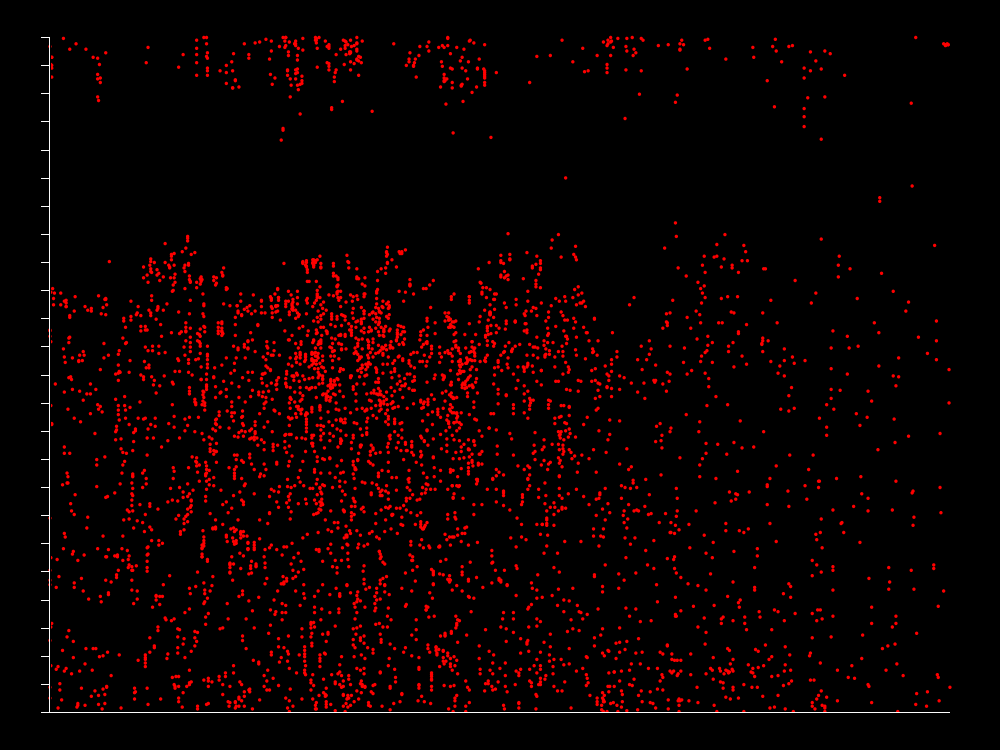
This is absolutely the last post on visualisations of plasticbag.org data unless someone sends in something else really cool – and this one is more of a clarification than anything else. Daniel Boyd created this really cool model of post time that had accurately predicted both the times I woke up and went to bed, but it had seemed to go a little pear-shaped as a visualisation at the time I switched to using MT. I’ll post the original graph below for those of you too lazy to look at it in its original context (slackers):

Anyway, the confusion emerged at the beginning of January 2003 when suddenly it looks like I was staying up all night and posting at completely random times of the day. I instinctively felt like this could not be right – and by instinctively I mean that I knew it wasn’t right because I’ve become mostly old and predictable in my early thirties. Enter Tom Carden again, who writes:

“The time of day chart is great, but I suspect that more careful analysis is needed here. For instance, I believe that the move to MT coincided with the enabling of comments. I suspect that’s why the time chart suddenly goes strange. Here’s one without the comments. It’s as you might expect – pretty much the same times, but less frequent.”

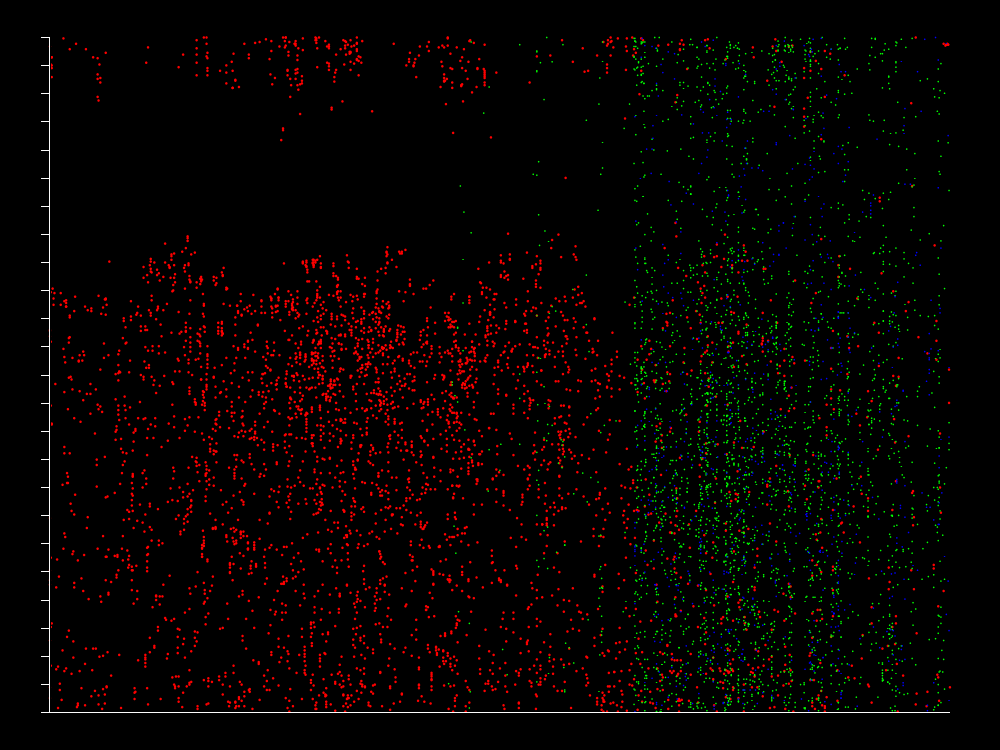
He’s also generated a visualisation that shows comments as green dots and trackbacks as blue. It’s harder to interpret these on images reduced so much, so if you’re gripped by this whole subject area you might want to check out his two larger-scaled graphs: Without Trackbacks and Comments and With Trackbacks and Comments. The smaller version looks like this:

By way of intepretation then, I think it’s clear that since moving to MT my posting has dropped enormously (there are other reasons for this of course – including my rather hardcore nine months working on Radio 3. Perhaps more interesting is that the same posting patterns during the day appear to have continued (first posts between eight and ten in the morning – last ones between 12 and 2am) but there is more deviation from this practice. Whether this just represents being at conferences in other time zones or something isn’t clear to me.

Looking at the comments and trackbacks, it seems clear that they’re much more consistent during the day and night – which probably reflects a fairly international audience (or a lot of insomniacs and filthy drunks). There does appear to be a bit of a concentration of comments at least between midday and six UK time – although that may just be a result of comments lagging after specific posts. That would also account for the fairly heavy striping in comments up and down the page – on occasion I seem to write something that a lot of people want to comment upon. The rest of the time – not so much… There are also some fairly clear stripes of total inactivity emerging – February/March-ish of this year seems a complete dead zone as does a good period around two-three months ago.

I think generally what this little project has taught me is that statistics and visualisations are are both really good fun and that they can expose to you patterns and behaviours and causalities that you may have suspected were there all along, but couldn’t be certain about. Along with projects like Audioscrobbler, I feel like I’m starting to get a strange and exotic new statistical understanding of my life. I can look at these diagrams and see myself in them. It makes me want graphs of the fibrous content of my excrement automatically generated by my loo – and a complete break down of the percentage of my floor which is covered with rubbish and books at any given moment in time. Somewhere in this stuff is self-knowledge!

Categories
Personal Publishing

Three more sets of visualisations…

Wow, so it’s nearly three in the morning, which is basically four in the morning since the clocks only changed a week ago, and I still appear to be up and awake and completely uninterested in sleep. I may as well take this opportunity to post a few more visualisations of the weblog data that I posted up a few days ago (Five Years of Weblog Data vs. The Visualisations). This batch pushes us in a few interesting new directions – some of which so interesting in fact that I have no concept whatsoever what they might signify or represent. In fact let’s start with those:

These two were undertaken by Dan Kaminski and were “run through the Phase Space Visualization process popularized by Michael Zalewski” using Phentropy. I will confess straightaway that I’ve spent a limited amount of time trying to work out what they mean, but remain as yet unsuccessful.

The second set of visualisations came in from Daniel Boyd and is a plot of when during each day I posted over the last five years:

The first three years here are astonishingly consistent and – as Daniel himself pointed out – the data would suggest that I go to bed between midnight and 2am and that I get up each morning around eight. This is stunningly accurate and highly representative of my normal behaviour. What’s less clear is what happens after the beginning of 2003 where the data starts to look remarkably less organised. I’m still not clear why this has happened – and in fact quite suspicious of how accurate that bit is. It seems to me more likely that some part of the data is corrupt around the beginning of 2004 than that my entire posting behaviour changed overnight. Except to say that yet again this phase shift seems to coincide with switching to using Movable Type.

Which brings me to the last visualisation. When I last posted these visualisations I pointed out that they seemed to suggest that the switch to Movable Type had resulted in longer posts and a drop in the rate of posting. In response Anil Dash mooted that Movable Type might be making my posts better thought out. Now of course, there’s a clear value judgement there, and one that is not necessarily correct. It’s quite conceivable that I’ve just got more wordy and long-winded and that MT has supported or even caused that shift. It’s not even clear that weblog posts should be better thought out – Matt has suggested to me in the past that another equally convincing model might be to think of MT as having broken the paradigm of incredibly fast and easy informal peer-to-peer publishing that Blogger created and was initially its USP.

So it’s just as well that we have Richard Soderberg out there. He decided to run a Flesch-Kinkaid reading analysis on each of my posts over the last five years and plot them on a graph. The solid darker line in the middle being the reading level in the US educational system that might be required to be able to read each post.

As you can see, the readability level of my site changes dramatically around the same time that I move to using MT. Over the first three years it seems to settle around eight on the Flesch-Kincaid scale. But after moving to MT, the average appears to be more around 10. More interesting still is that the extremes in both directions have started to diminish. There are few posts that plummet down to the infantile depths of the scale and few that stretch upwards towards unintelligibility. Richard’s also provided a useful CSV of some key metrics. When you investigate it, you’ll see that each post has its complexity described in as either childish, acceptable, ideal, difficult or unreadable. I wonder if the same metrics apply with writing for the web as for elsewhere (we’re normally told by usability people that sentences should be shorter and punchier and articles not as long when we write online) but if they do the site has definitely moved much more heavily towards the ‘ideal’ intelligibility rating and that does appear to coincide with a move to MT.

So there you go – three new sets of visualisations and a stunning revelation that they should put on the marketing bumph. That’s right, ladies and gentlemen, apparently MT actually makes you smarter!